
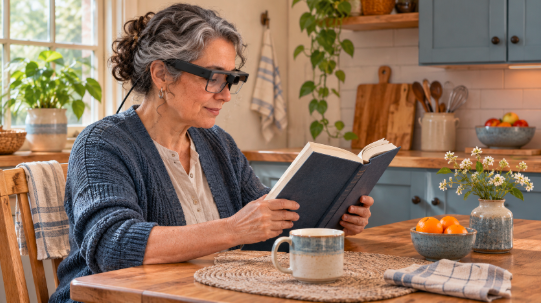
A small font on a menu. A face across the room. These scenarios can become harder to navigate with deteriorating sight.
A range of low vision wearable devices can help in these scenarios by either magnifying the scene in front of you or reading out text. Each has its place, but the best option depends on the task you need to perform.
Approximately 9 million US residents reported being blind or having serious difficulty seeing, even with glasses or contact lenses, according to the American Community Survey in 2024. Technology may enhance your ability to see but will not reverse your visual impairment.
What You’ll Learn
- What Wearable Vision Aids Actually Do
- Best Low Vision Wearable Devices by Daily Task
- How to Choose a Device That Fits
- Try Before You Buy: A Practical Test
- Everyday Use and Safety Tips
- Wrapping It Up
What Wearable Vision Aids Actually Do
Wearable technology allows the user to modify or receive information from the environment in a different way.
Electronic magnification glasses are generally made up of one or more cameras and displays that present a digitally magnified image. Zoom level, and sometimes image properties such as contrast, are usually user adjustable. Alternatively, other wearable devices convert images of text into audible speech.
Non-electronic options include a pair of optical telescopic lenses that will allow you to view magnified images of more distant objects.
Higher magnification can narrow the view, so the right device depends on the task you want to perform.
Best Low Vision Wearable Devices by Daily Task
There is no one ‘best’ device – it will depend on what tasks you struggle with most on a day-to-day basis.
Once you know your key areas of concern, you can research low vision product solutions that will be most beneficial to your daily life, as opposed to focusing on feature set alone.
The following 5 wearable options for people with low vision are worth looking into:
Electronic glasses – reading, faces and hands-free
Best For: Reading, seeing faces and general hands-free use.
Examples: eSight Go and NuEyes Pro4 LV are examples of this type of device, all working similarly via camera + display to provide electronic magnification of the environment in front of the user’s eyes.
Benefits: Can allow for increased magnification and contrast to facilitate reading and recognition of faces and objects. This is more likely to benefit individuals with some form of central scotoma/vision loss.
Caveats: Effectiveness will depend on your own specific pattern of visual impairment. If trying out electronic glasses, make sure you have a range of items at typical reading and conversation distances to test (e.g., a book, phone, another person’s face). Remember that higher magnification may not be ideal for your needs!
Headsets – TV, reading at arm’s length and detailed tasks
Best For: Watching TV and other tasks at a seated/arm’s-length distance (e.g., reading, detailed craft work).
Examples: Headsets such as the Patriot ViewPoint or Acesight VR.
Benefits: The Patriot ViewPoint can convert printed words to speech; the Acesight VR allows users to manipulate image properties (eg increased contrast and outline) to facilitate visual perception of objects and text.
Caveats: Will reduce field of view to that shown on the headset screen and may feel bulky or heavy. Users should trial these whilst seated only and avoid walking around with these unless professionally cleared for this use.
Camera readers – for those who wish to ‘hear’ text
Best For: Those who would benefit from hearing words rather than trying to visually decipher them themselves.
Examples: Camera readers, such as the OrCam MyEye 3 Pro, can be clipped onto spectacle frames to ‘read out’ printed words.
Benefits: Useful to ‘hear’ content of books, notices, food labels etc.
Caveats: Camera readers will not be 100% reliable at all times when reading text, so they should be tested under varying conditions, and any important instructions (e.g., from medications) should be cross-checked manually.
Glasses with contrast enhancement / AR capabilities
Best For: Individuals seeking increased contrast and augmented reality to facilitate identification of objects, edges and other image details.
Examples: Some smart glasses, such as EYE7 AR, claim to allow users to enhance contrast, recognize objects, and more.
Benefits: May aid detection and recognition of objects and features in the user’s surroundings with hands-free operation.
Caveats: As per above, it is not guaranteed that your ability to perceive visual information will improve with these added features, so users are advised to compare a target of interest with/without each feature enabled (also note if there is any glare, distracting features or compromised view of your wider surroundings).
Bioptic telescopic magnification
Best For: Magnification of distant targets (eg billboards, screen in lecture theatre) that cannot otherwise be seen in sufficient detail.
Examples: Bioptic telescopes are incorporated within/above the lens of a pair of glasses and allow the user to glance through to magnify distant targets.
Benefits: Provides targeted distance magnification without requiring a fully electronic headset.
Caveats: Small field of view, and users require adequate fitting and instructions. Cannot be used in lieu of regular prescriptive glasses, and there are rules around bioptic use when driving – users must seek professional guidance to establish suitability and driving eligibility.
How to Choose a Device That Fits
Choose the task first, then consider how your vision affects it. Different people may need different wearables.
Consider seeking a formal low vision assessment to determine what may provide you the greatest assistance to improve each task you are struggling to perform.
Also keep in mind:
- Function: Ability to access settings independently (touchscreen, buttons, audio)
- Comfort: Weight of the device, whether it sits well over existing spectacles and hearing aids.
- Battery life: Is it adequate for your intended use? Any other devices required to operate?
- Financial cost & provision of training: Is there a hire period? Can you return it if unsuitable?
An expensive device that stays in its case is no bargain. A simpler aid you use every day may offer more value.
Try Before You Buy: A Practical Test
Trial a device with real examples of tasks you want to perform, not just the salesperson’s samples.
Ideally, perform the following sequence:
- Read from a document that contains typical print size/font that you would want to read regularly
- If possible, vary the distance at which the material is presented to test near and distance viewing, if offered
- Assess the performance of the device under varying illumination conditions (e.g. direct sunlight, low-light room)
- Trial the device for a reasonable period of time to assess comfort and ease-of-use
If using an audio-based device, note its clarity and ease of use, and whether it pauses the spoken text when ambient background noise is present.
Overall, did the device improve your ability to complete the target task, and was it free of undesirable side effects? If unsure, repeat a low vision assessment to further investigate your needs.
Everyday Use and Safety Tips
While technology can be advantageous in facilitating reading, recreation and certain ADLs, it will not grant normal vision nor replicate it. Be aware of any limitations in your field of view caused by the camera’s display that may not alert you to potential dangers around you.
Some head-mounted displays can limit awareness while moving. Follow your rehabilitation specialist’s safety advice and keep using recommended mobility aids.
Don’t neglect other low vision aids that may be helpful to incorporate alongside wearable technology. These could include enhanced illumination of the area, minimizing glare, increasing contrast of the target item and handheld magnification aids.
Additionally, if you use any technology that may store personal data/images/text, familiarise yourself with the manufacturer’s privacy guidelines.
Wrapping It Up
The best wearable devices depend on your daily tasks and comfort. You might benefit most from magnification, spoken text or better distance detail.
Determine your priorities and have the technology assessed with reference to your day-to-day tasks, ideally with the input of your low vision clinician.
 There is a specific skill involved in explaining something clearly — one that is completely separate from actually knowing the subject. Peter R. has both. They has spent years working with fitness performance strategies in a hands-on capacity, and an equal amount of time figuring out how to translate that experience into writing that people with different backgrounds can actually absorb and use.
Peter tends to approach complex subjects — Fitness Performance Strategies, Wellness Wave, Targeted Recovery Techniques being good examples — by starting with what the reader already knows, then building outward from there rather than dropping them in the deep end. It sounds like a small thing. In practice it makes a significant difference in whether someone finishes the article or abandons it halfway through. They is also good at knowing when to stop — a surprisingly underrated skill. Some writers bury useful information under so many caveats and qualifications that the point disappears. Peter knows where the point is and gets there without too many detours.
The practical effect of all this is that people who read Peter's work tend to come away actually capable of doing something with it. Not just vaguely informed — actually capable. For a writer working in fitness performance strategies, that is probably the best possible outcome, and it's the standard Peter holds they's own work to.